Outsourced Photo Editing Workflow: Brief, Transfer, Review and Final QC Without Rework
Build an outsource photo editing workflow covering briefs, secure file handoff, sample reviews, revisions, privacy, final QC and rework tracking.

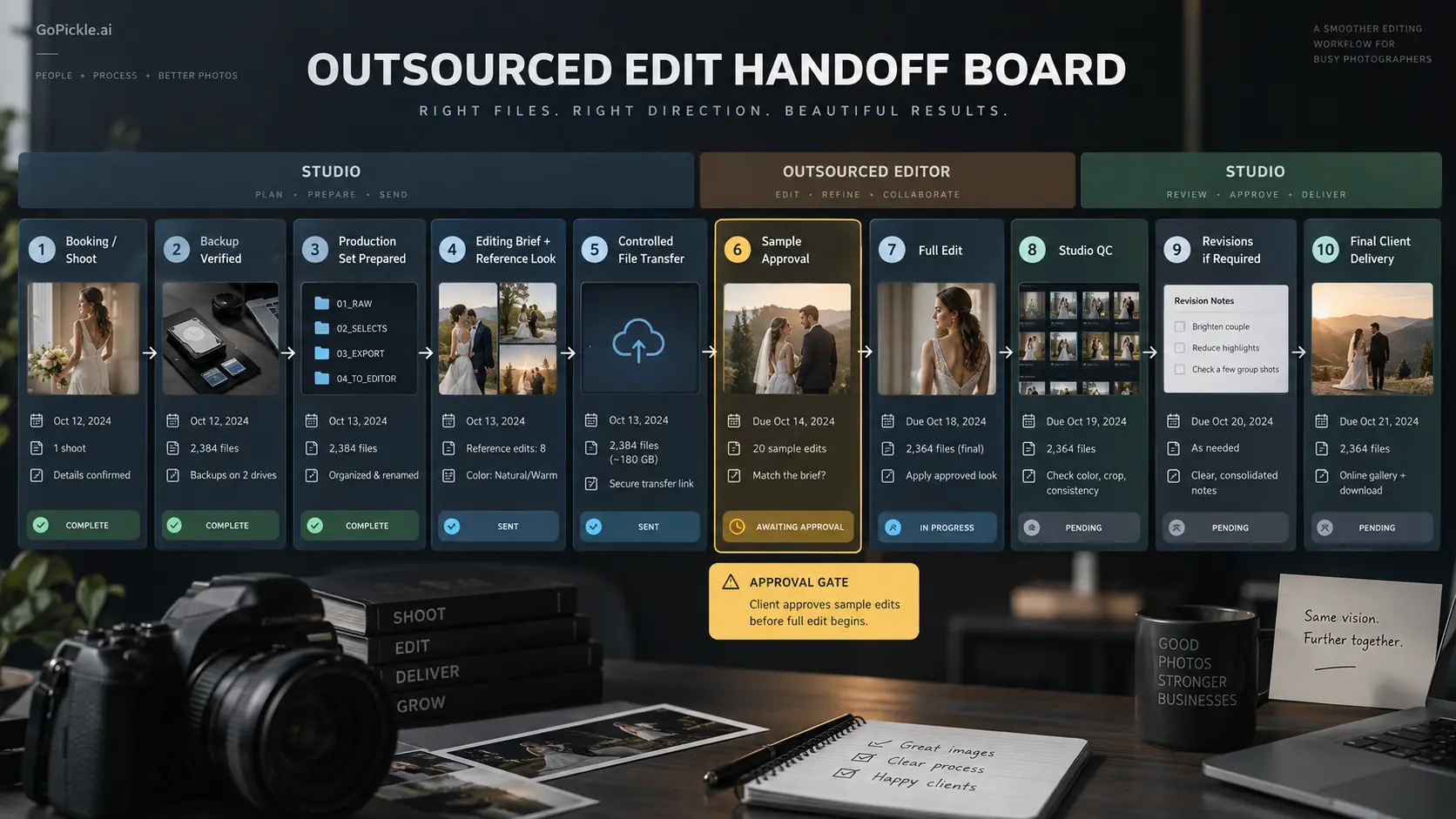
Outsourcing photo editing can remove a serious production bottleneck from a photography business, but only when the handoff is cleaner than the work it replaces. Sending a folder to an editor with a message such as “same look as last time” may work when one photographer and one trusted editor have worked together for years. It becomes fragile when a studio has several photographers, multiple editors, changing wedding conditions, client-specific requests and firm delivery dates.
A reliable outsource photo editing workflow should answer a few practical questions before anyone starts adjusting photographs: What exactly is being outsourced? Which files belong to the job? Which photographs must not be changed? What does the finished gallery need to look like? When should the editor stop and ask rather than interpret? Who performs final quality control? What happens to the files after the work is approved?
That operational layer is what turns photo editing outsourcing for photographers from emergency capacity into a repeatable production system.
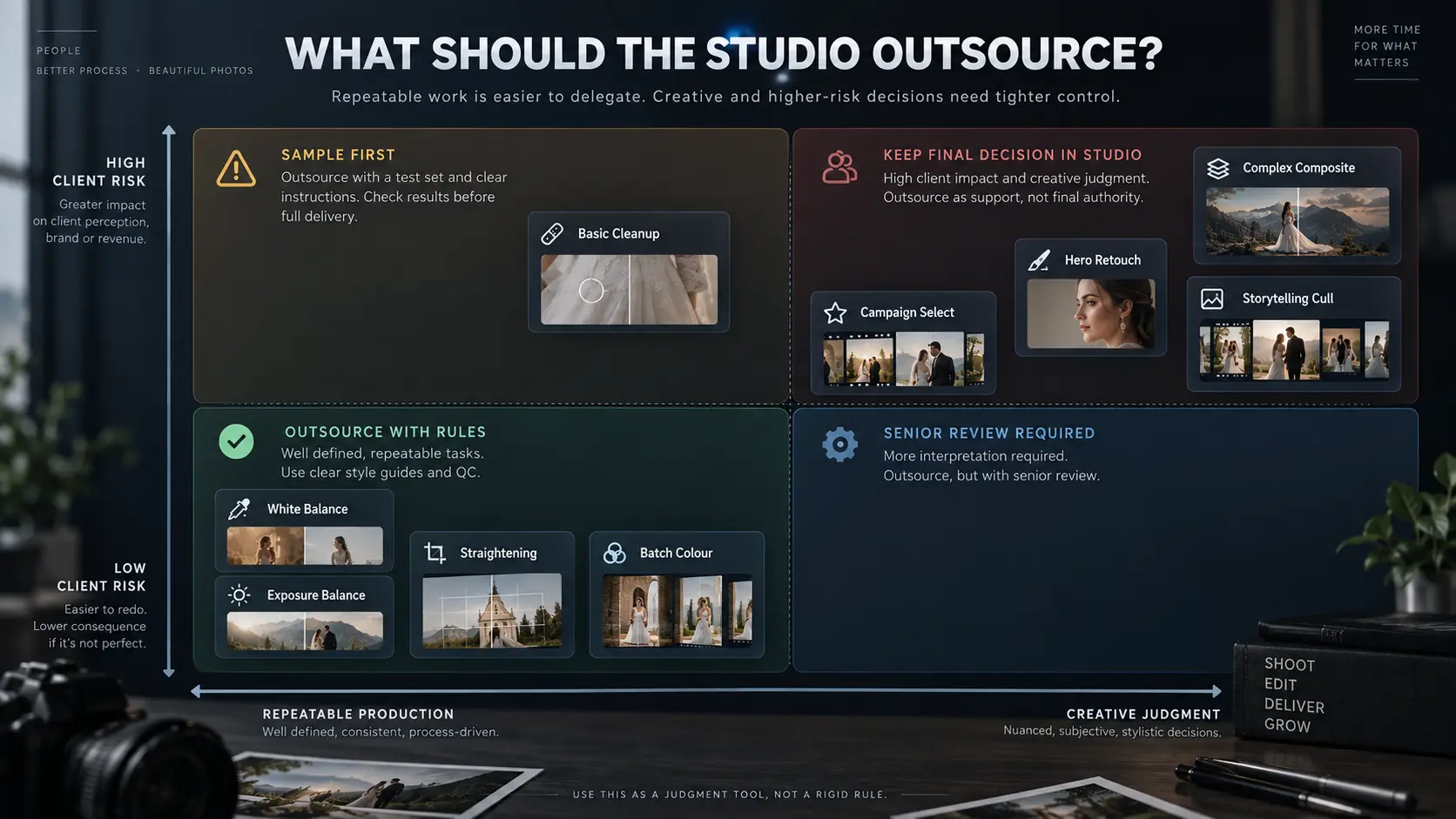
Decide what work is safe to outsource
Start by separating editing tasks according to how repeatable and how creatively sensitive they are. Outsourcing works particularly well when the studio can describe the expected result clearly: exposure balancing, white balance, consistent colour treatment, straightening, cropping within agreed rules, noise reduction, simple cleanup or applying an established house look across a large set.
More subjective work deserves stronger controls. A wedding photographer may be comfortable outsourcing the base edit across an entire reception but still want the studio's senior photographer to finish hero portraits, difficult mixed-light scenes, black-and-white conversions or photographs intended for a premium album spread. A commercial photographer may outsource clipping and routine cleanup while retaining final responsibility for campaign images where colour, product accuracy or compositing has contractual importance.
A useful rule is to outsource defined production work, not undefined creative judgment.
| Work type | Usually easier to outsource | Needs tighter studio control |
|---|---|---|
| Base correction | Exposure, white balance, basic tonal consistency | Unusual lighting requiring creative interpretation |
| Colour | Applying an established reference look | Developing a new look for the project |
| Cropping | Standard crop and straightening rules | Composition changes on important hero images |
| Retouching | Agreed blemish or distraction cleanup | Body reshaping, major object removal or complex compositing |
| Selection | Clearly defined technical culling rules | Storytelling and emotionally important wedding moments |
| Final output | Export to documented specifications | Client-facing final approval |
If the studio is outsourcing because the internal editing queue has become unmanageable, first identify which work is actually causing the constraint. Our guide to triaging a photography editing backlog helps separate genuinely urgent production from jobs that are simply sitting in the same pending folder.
Prepare the files and the reference look before handoff
The editing workflow should never begin by moving the studio's only working copy of a shoot. Complete ingestion and verify your backup process first. For irreplaceable wedding, event or commercial work, file transfer to an editor is a production step, not a backup strategy. Our photography file backup workflow covers that layer separately.
Next, make the production set unambiguous. Keep filenames or another stable identifier intact, separate excluded photographs, identify any files requiring special treatment and make sure the editor knows whether the folder represents the complete job, one event, one camera or only selected images. With outsourced wedding photo editing, this matters especially when several photographers contributed files across different functions and lighting conditions.
The editor also needs a visual reference that represents the studio's current work rather than a vague description such as “warm and cinematic.” Provide finished examples covering the conditions that matter for that assignment: daylight skin tones, indoor tungsten, flash, stage lighting, darker reception scenes and any signature black-and-white treatment. If you use presets or profiles, explain how they fit into the workflow rather than assuming the preset alone defines the finished style.
The transfer format should match the work being outsourced. Some Lightroom Classic workflows can use catalog data and Smart Previews for Develop-stage editing without sending full original files, while detailed retouching or other workflows may require originals. Agree the format with the editing partner instead of automatically sending every RAW file because it is available.
Write an editing brief the vendor can actually follow
A photography editing service workflow becomes much easier to manage when every job begins with a compact production brief. The objective is not to write a long creative essay. The editor needs enough information to make consistent decisions without stopping every twenty photographs to ask a question.
A useful editing brief should contain:
- Job identity: client or booking reference, shoot date and included events or folders.
- Scope: culling, base editing, colour correction, retouching, export or whichever stages are included.
- Reference look: approved gallery, sample edits, preset/profile where relevant and specific colour preferences.
- Priority files: hero photographs, previews, album images or images needing senior attention.
- Do-not-change rules: crops, skin texture, background elements, body shape, signage, products or other details that must remain untouched.
- Exceptions: difficult lighting, mixed cameras, intentional underexposure, unusual colour treatment or client-specific notes.
- Output: expected file type, dimensions where applicable, naming convention and other delivery specifications.
- Deadline: when the edited files must return to the studio, not merely the client's final delivery date.
- Revision process: who reviews, how feedback will be recorded and what counts as a revision.
That internal deadline matters. If your client promise is also the day the outsourced edit arrives, the studio has no room for QC, corrections, export problems or a delayed transfer. Set the production plan against a realistic photography turnaround time rather than treating outsourcing as unlimited instant capacity.
Control transfer, access and file custody
A send photos to editor workflow needs a custody policy as much as it needs an upload link. Decide which system will transfer the files, who receives access, how long that access remains active and when the editor is expected to remove local or cloud copies after approval.
Give the editing partner only the material necessary for the assignment. A colour-correction editor usually does not need unrelated client folders, invoices, contact information or unrestricted access to the studio's entire archive. Where the transfer service supports controlled permissions, authentication or expiring access, configure them according to the sensitivity of the work.
Privacy requirements differ by jurisdiction, and photographs of identifiable people may fall within applicable privacy or data-protection laws. Studios working with external editing companies should therefore understand where files are processed, whether subcontractors can access them, what the vendor retains, how deletion works and whether appropriate contractual terms are required for the markets and clients involved. Commercial, school, healthcare, confidential-event and other sensitive assignments may need stricter controls than an ordinary portfolio shoot.
The important operational principle is straightforward: outsourcing the edit does not outsource the studio's responsibility for knowing where client material has gone.
Review a small sample before the complete gallery
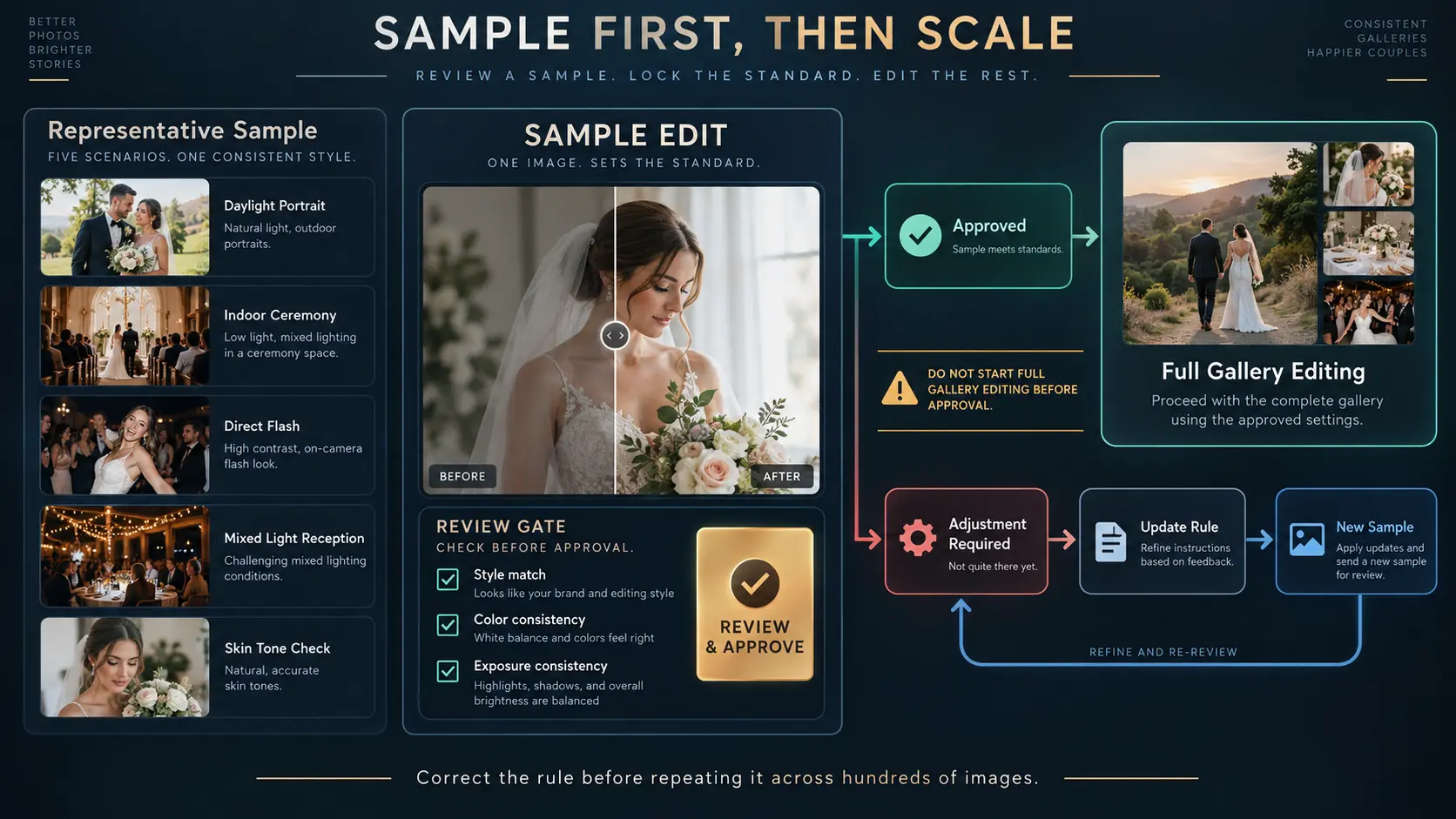
Do not wait for an entire wedding to be edited before discovering that the skin tones, contrast or crop treatment are wrong.
For a new editing partner, a changed preset, an unfamiliar photographer or a difficult job, create an approval gate early in production. Ask for a representative sample covering the real challenges in the assignment. A wedding sample might include outdoor portraits, indoor ceremony photographs, direct flash, reception lighting and a few important skin-tone combinations rather than twenty nearly identical daylight images.
Review the sample for the decisions the editor will repeat hundreds of times. If the overall temperature is too warm, greens are being shifted too heavily or flash photographs are consistently over-brightened, correct the rule before full production begins. One early instruction can prevent an entire gallery from returning for revision.
This is also a useful buying test when comparing photo editing outsourcing services. A polished website can show excellent finished photographs; a representative trial reveals how well the service interprets your files, your cameras, your lighting and your editing language.
Run final QC before the work reaches the client
The external editor should perform their own checks, but the photography studio still owns the client-facing result. Final photo editing quality control should therefore be a defined stage rather than a quick scroll through the first few images.
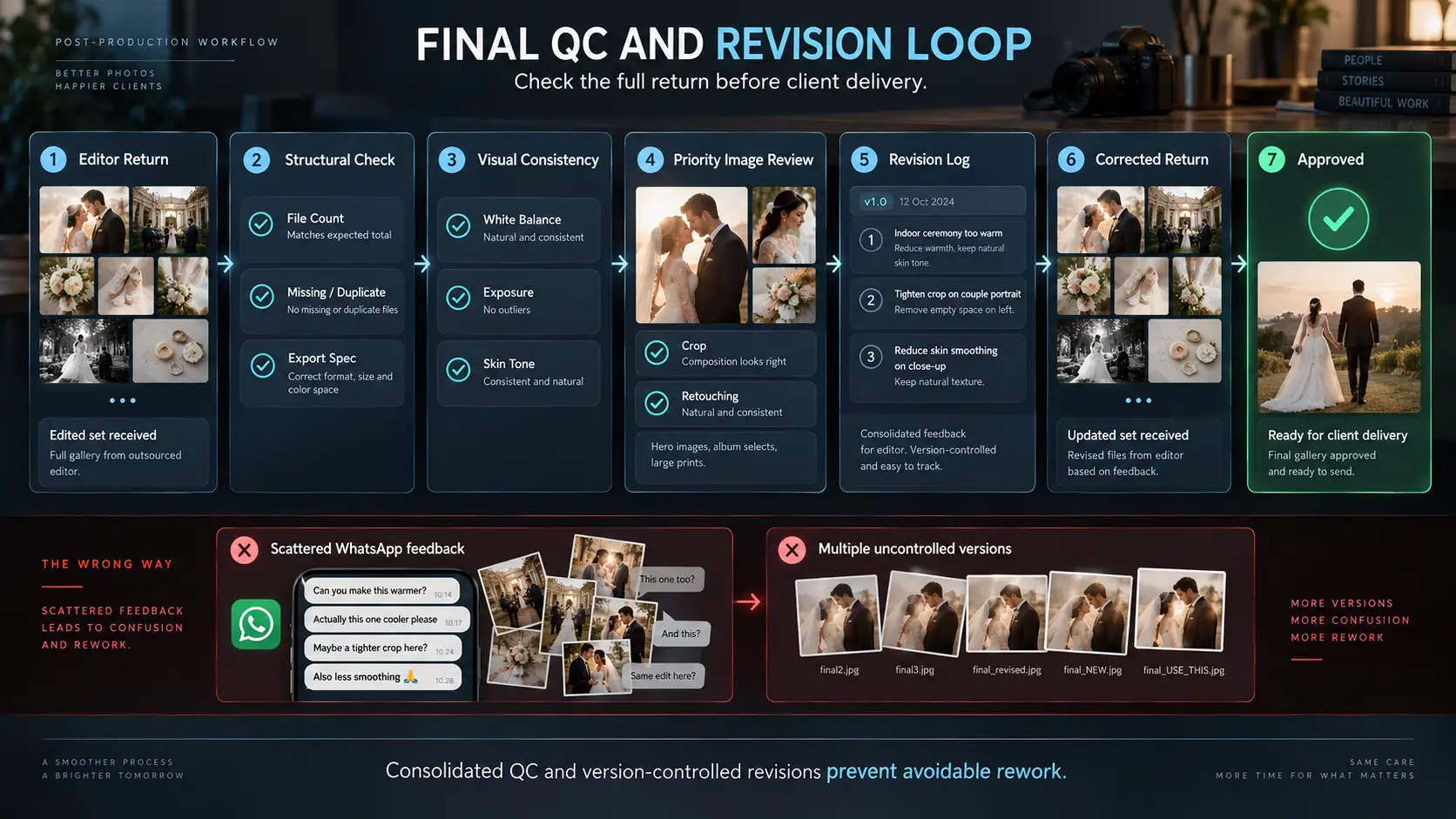
Check the full set for structural problems first: expected file count, missing photographs, duplicates, filenames, event or folder placement and export specifications. Then review visual consistency across the gallery. Look for sudden changes in white balance, inconsistent exposure, skin-tone shifts, aggressive noise reduction, halos, poor masks, accidental crop changes, unwanted retouching, inconsistent black-and-white treatment and any obvious automated-editing artefacts.
Important images deserve deliberate review even when the wider batch looks consistent. Wedding hero photographs, commercial campaign selects, album spreads, large-print files and anything carrying unusual client instructions should not rely solely on statistical confidence from the rest of the gallery.
When revisions are needed, consolidate them. Sending ten separate messages throughout the day encourages inconsistent interpretation and wastes both sides' time. Group feedback by rule where possible: “reduce the magenta cast across indoor ceremony files” is more actionable than individually flagging fifty photographs with “colour wrong.”
Keep version states clear as well. The studio should know which return is the initial edit, which is the revised set and which version has passed final QC. That prevents corrected photographs from being mixed with older exports during delivery.
For the final client-facing handoff, the separate photography gallery delivery QC checklist covers the checks that happen after editing is approved and before the client receives the gallery.
Measure rework, turnaround and the real cost of outsourcing
The editor's invoice does not tell you whether outsourcing is working.
Track how much internal effort remains after the files come back. A low per-image editing rate loses its advantage if the studio owner then spends four hours correcting every wedding. A more expensive editing partner may be commercially stronger if the first return is consistently close to delivery-ready.
Useful measures include first-pass acceptance, number of revision rounds, studio QC time, rework hours, actual turnaround against the agreed deadline and total outsourced editing cost per job. For repeat work, also watch whether those numbers improve as the editor learns the studio's style.
A practical calculation is:
Effective outsourced editing cost = vendor fee + handoff/admin time + studio QC time + revision time + avoidable delay cost
The purpose is not to reduce every minute to a financial spreadsheet. It is to expose false savings. Outsourcing should release internal capacity rather than move the same editing hours from Lightroom into correction notes and follow-up messages.
If outsourced volume becomes steady enough that the studio is paying for substantial editing every month, compare the model with a dedicated in-house role. We cover that decision in when a photography studio should hire its first dedicated photo editor.
Keep the editing handoff connected to the booking
The specialist editing application and file-transfer service do not have to become the centre of the studio's entire workflow.
The production context still belongs to the photography booking: what the client purchased, which deliverables are due, who owns the edit, when the files should return and what needs to happen after approval. GoPickle's photography Booking Management workflow keeps bookings, team responsibilities, deliverables and follow-through connected while specialist creative and storage tools can remain separate.
That distinction matters. We are not suggesting that GoPickle should become the RAW-transfer or editing engine. Keep the actual editing files in the specialist workflow that suits your studio. What needs to remain visible is the operational state around them.
Once final QC is complete, approved photographs can move into a GoPickle Client Gallery for organised client-facing delivery rather than letting an internal editor-transfer folder accidentally become the client's final experience.
A strong outsource photo editing workflow therefore has two clean handoffs: one from the studio to the editor, and another from approved post-production into client delivery. When the brief, sample gate, custody rules, QC ownership and revision process are clear, outsourcing stops creating another layer of management and starts doing what the studio hired it to do: return usable production capacity.