Photography Crew Scheduling Software: Manage Availability, Assignments and Freelancers Without WhatsApp Chaos
Compare photography crew scheduling software for availability, event assignments, freelancers, confirmations, access, mobile use and crew payments.

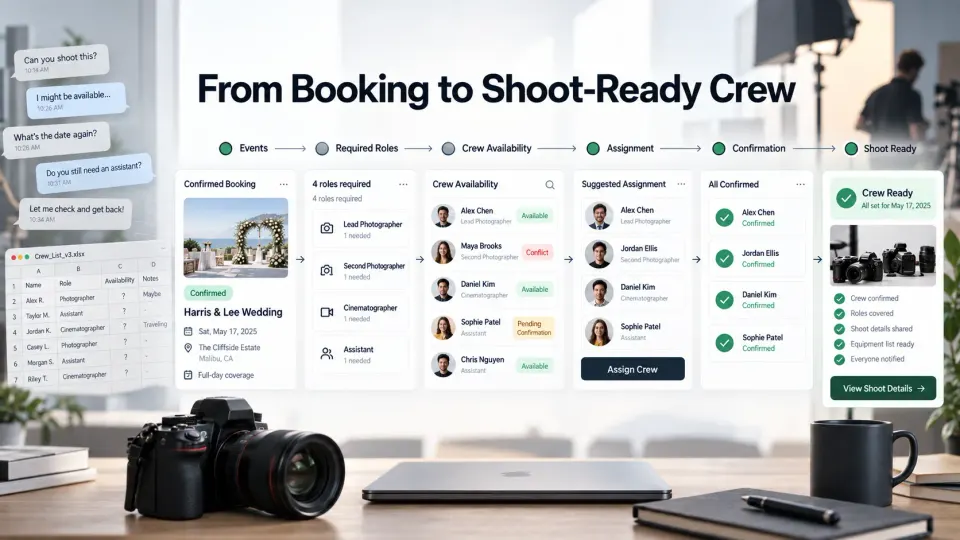
A photography studio can have ten people in its crew directory and still discover the night before a shoot that the second photographer has not confirmed, the cinematographer is committed elsewhere, nobody knows which assistant is reporting to which venue, and a freelancer's payment was agreed somewhere inside a message thread.
That is the point where a shared calendar stops being enough.
Photography crew scheduling software is meant to answer a more demanding operational question than “Who is working on Saturday?” A professional studio needs to move from a confirmed booking to its individual events, identify the roles required for each event, find suitable people who are genuinely available, assign them, get those assignments confirmed, give each person the correct shoot information and eventually reconcile the work with salary or event-wise payment.
The complete workflow looks more like this:
Booking → Events → Required Roles → Available Crew → Assignment → Confirmation → Shoot Information → Handoff → Crew Payment
That distinction matters for wedding studios, event photography companies, commercial production teams and any photography business that regularly combines employees, second shooters, assistants, cinematographers, editors or freelancers. In this guide, we will look at what photography team scheduling software should actually do, where generic scheduling tools fall short and what to test before moving your crew operation into a new system.
When does a photography studio need crew scheduling software?
A solo photographer who occasionally asks one trusted assistant to help with a large shoot may not need a dedicated crew system yet. A calendar, clear written agreement and disciplined communication can handle that level of complexity.
The need changes when staffing becomes a repeated operational process rather than an occasional exception. You may be reaching that point if you regularly check several people before accepting dates, use different freelancers depending on the job, run multiple shoots on the same day, assign separate teams to different wedding functions, keep asking who has confirmed, or discover that information about call times and venues has to be resent every time somebody joins the crew.
Another strong signal is that availability has become dependent on one person's memory. If a studio manager has to message five photographers before telling a client whether the studio can cover a date, the problem is no longer simply communication. It is capacity planning.
Growing studios also need to see more than free dates. A photographer may technically be free but unsuitable for the required role, committed to another event later that day, travelling from a previous assignment or already carrying too much work. Our photography crew availability matrix guide covers that operational problem in more detail.
The reason to adopt crew software is therefore not “we have employees.” It is that staffing each booking has become difficult to verify reliably.
Calendar software is not crew scheduling
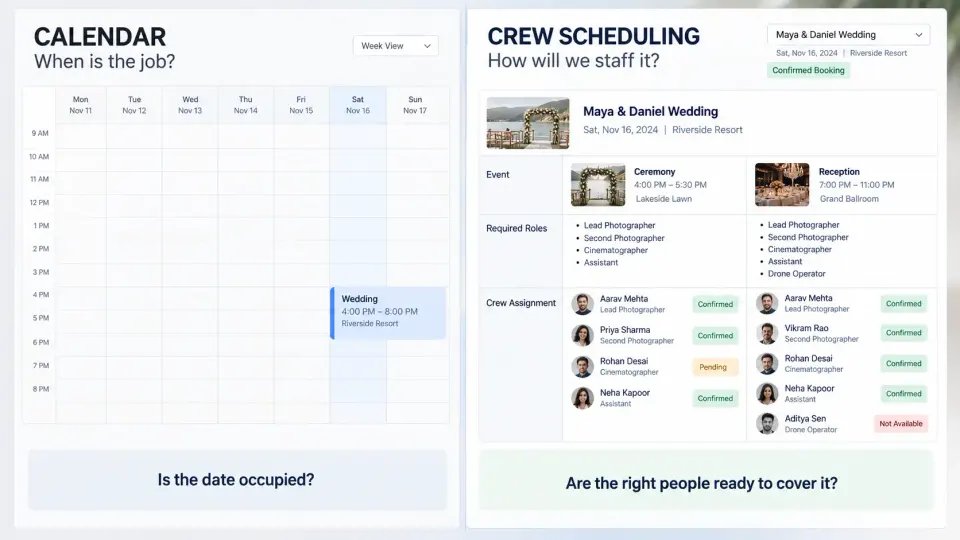
A calendar is excellent at telling you that something happens from 4:00 PM to 8:00 PM. It is much weaker at explaining what resources are required to fulfil that promise.
Suppose a studio has confirmed a two-day wedding containing a welcome dinner, ceremony and reception. Looking at the booking on a calendar tells you when those events happen. It does not necessarily tell you that the ceremony needs one lead photographer, two supporting photographers and a cinematographer, while the reception requires another assistant and a different video team.
Good photographer scheduling software for teams connects the date to the work behind it.
That means the scheduling layer should understand concepts such as booking, event, role, assignment, availability and confirmation. When those records are connected, the studio can ask a useful question such as:
Who is suitable and genuinely available for the second-photographer role at Saturday's ceremony?
That is a very different question from:
Who has nothing on their calendar on Saturday?
Generic appointment software can still be valuable for client consultations, portrait sessions or self-bookable time slots. But photography crew assignment software has a different job: it helps the studio fulfil work that has already been sold.
Employees, freelancers and second shooters need different handling
A crew system should not assume everybody works for the studio in the same way.
A permanent photographer may have regular working days, a monthly salary and broader access to studio operations. A freelance cinematographer may only appear when a particular booking needs video coverage and may charge a different amount for each assignment. A second shooter could work repeatedly with the studio while still managing their own bookings elsewhere. An assistant might be assigned according to equipment requirements rather than photography style.
That is why photography staff scheduling becomes more complicated as studios adopt hybrid teams. The schedule has to represent availability without pretending that every person is under identical employment terms.
For freelancers in particular, available and confirmed should remain separate concepts. A photographer saying “I can probably do that date” is not the same as accepting a specific event, venue, reporting time, role and agreed fee.
Studios building a larger external pool may also find our freelance photographer onboarding checklist useful. It covers the information and working expectations that should exist before someone becomes part of your regular crew network.
Employment classification, payroll, tax, insurance and contractor rules vary by country and jurisdiction, so scheduling software should support your operational process without being treated as a substitute for appropriate local legal or accounting advice.
Build a photography crew directory
The crew directory is the foundation of photography studio team management, but it should contain more than names and phone numbers.
For each person, consider recording the information that actually affects whether you would assign them to a job: primary role, secondary roles, skill level where useful, employment or freelancer relationship, normal working area, travel willingness, equipment considerations, usual payment model and any relevant operational notes.
A useful record might show:
- Primary role: Lead photographer
- Additional roles: Second photographer, lighting
- Assignment types: Weddings, corporate events
- Travel: Available for destination work
- Engagement: Regular freelancer
- Payment model: Event-wise
- Current scheduling context: Available / assigned / unavailable
The directory should narrow your choices rather than become another address book. If a studio needs a strong candid photographer for a large evening reception, the scheduling process should help identify people who are appropriate for that requirement instead of making the manager scan every person manually.
Role clarity becomes especially important when deciding between different production positions. Our guide to second shooters versus photography assistants explains why these roles solve very different problems even though both may appear under the same booking.
Check availability before promising coverage
Studios often check the client's date first and crew availability second. That order can become expensive when the business sells more coverage than it can confidently staff.
For larger bookings, crew feasibility should form part of the capacity check before the studio makes a firm promise. Photographer availability software should show confirmed assignments, unavailable periods and overlapping commitments clearly enough that the person discussing the booking can understand whether the required team is realistically obtainable.
This does not mean reserving half the crew every time a new enquiry arrives. Tentative work needs its own rules. If you place temporary holds on crew while a quotation is being considered, the hold should have a reason and a review or expiry point. Otherwise, speculative enquiries gradually make capable photographers look permanently unavailable.
Availability also needs context. An employee who has no event marked at 7:00 PM may still be unsuitable if they are covering another job several hours away that afternoon. A freelancer who appears open might already have verbally committed elsewhere. A photographer completing three consecutive late-night events may technically have an empty calendar slot while being a poor operational choice for another demanding assignment.
A useful photographer rota therefore shows capacity, not merely blank squares.
Prevent double-booking photographers
Double-booking is usually presented as a calendar problem. In a team environment, it is more accurately an assignment conflict.
The same person might be added to two events that overlap completely. More subtly, they might be assigned to a ceremony that ends at 5:30 PM and another event beginning at 6:00 PM in a different part of the city. Both bookings can look valid when viewed independently.
A practical crew management system should make those conflicts visible before shoot day.
This is one reason photography team management software should work from the same booking and event data that the studio uses operationally. When crew planning happens in a separate spreadsheet, the spreadsheet can become outdated the moment a client changes a venue or timing.
The goal is not to eliminate human judgement. Software cannot know every traffic condition, travel complication or personal limitation. Its role is to surface conflicts early enough for a manager to make the judgement while there is still time to change the plan.
Assign by event, not only by wedding
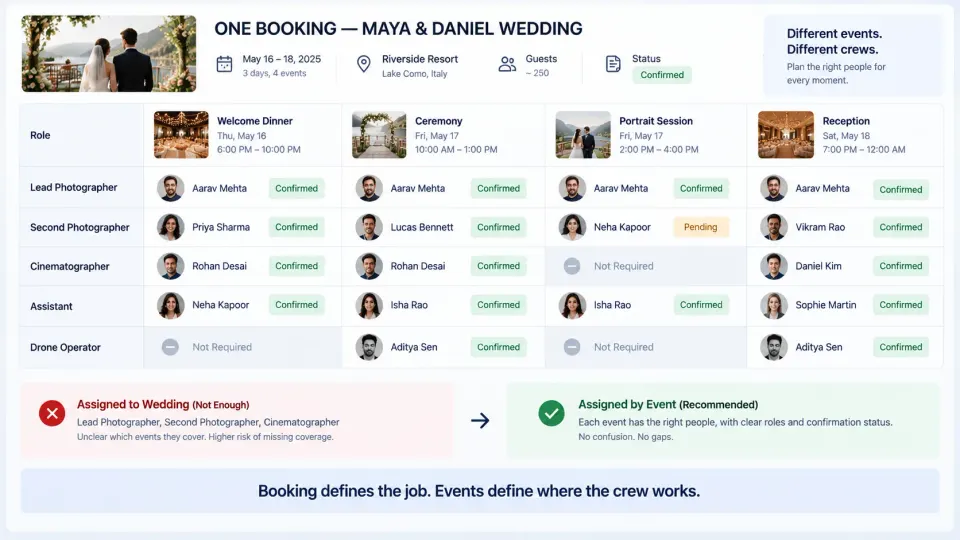
Large photography jobs often fail operationally because the studio says somebody is “assigned to the wedding” without defining where that person is actually needed.
Imagine a three-day booking containing five functions. The lead photographer may cover all five. A second photographer might be needed only for the ceremony and reception. A cinematographer may cover four. A drone operator could be required for one outdoor function. An assistant may report only during the most equipment-heavy event.
The booking is the commercial container. The event is where the crew actually works.
That is why event-level assignments matter in wedding photography, conferences, festivals, multi-location corporate productions and any job where staffing changes throughout the schedule. GoPickle's photography booking management workflow is built around this distinction: one booking can contain multiple events, each with its own timing, venue and crew context.
Assign by photography role and skill
Availability answers only half the staffing question.
If six photographers are free but the booking needs two people capable of handling difficult low-light event coverage, the studio does not have six equally valid options. Crew scheduling should help answer both:
Who is available?
and
Who should do this work?
Roles might include lead photographer, supporting photographer, traditional photographer, candid photographer, cinematographer, drone operator, lighting assistant, production assistant, editor or album designer. The exact naming should follow the studio's working model rather than a universal template.
Some studios will need additional information about experience, equipment, language, location or specialist capability. Others can keep the directory much simpler. The important principle is that headcount should never be confused with capacity.
When studios grow, this becomes part of a wider staffing decision. Our comparison of freelance versus full-time photographers explains how permanent staff and external specialists can complement one another when workload changes across the year.
Track confirmation before shoot day
Adding a photographer's name to an event should not automatically mean that the assignment is secure.
A useful workflow separates assigned from confirmed. This is particularly important for freelance photographer scheduling because the person may be considering work from several studios.
Before the event, the studio should be able to identify at least four different conditions:
- the role is filled and confirmed;
- somebody is assigned but confirmation is still pending;
- the required role remains unfilled;
- an assignment conflict needs intervention.
This sounds basic, but it changes the quality of a pre-shoot review. Instead of asking the group, “Everyone confirmed for tomorrow?”, the manager can inspect the booking and follow up only where something is unresolved.
Confirmation should also refer to the actual assignment. Someone should know what event they accepted, the role they are performing, where they are reporting and when they are expected.
Give crew only the information they need
A studio may hold extensive information about a booking: client details, quotation value, invoices, internal notes, payment balances, deliverables, contracts, event schedules and production tasks.
Most crew members do not need all of it.
The photographer covering the reception may need the event date, venue, reporting time, role, relevant client contact, shoot instructions and assigned tasks. The finance person may need payout context. An editor may need the booking identity, handoff details and editing responsibilities without needing unrelated sales records.
Role-based access is therefore an important feature to examine when comparing crew management software for photographers. It reduces unnecessary information exposure while still giving people enough context to perform the work.
This is also healthier operationally. A studio should not be forced to choose between “send the freelancer everything” and “keep the booking hidden and manually copy information into WhatsApp.”
Handle last-minute replacements
People get sick. Trains and flights are delayed. Vehicles fail. Family emergencies happen. Freelancers occasionally cancel.
Crew software cannot prevent these events, but it can shorten the time required to understand the damage and rebuild the plan.
When a crew member drops out, the studio should be able to identify the affected event and role, check other suitable people, review their availability, make a replacement assignment and ensure the new person receives the same current event information.
The worst time to discover that your freelancer database contains no information about roles or availability is three hours before coverage begins.
Studios that depend on external photographers should build replacement depth before the busy season. Our backup photographer plan explains how to identify critical roles and pre-qualify substitute crew before an emergency happens.
Track event-wise pay and salary
Scheduling and crew cost are closely connected because each assignment can create a financial obligation.
Permanent employees may be paid on salary. Freelancers may receive a fixed amount per event, day, role or project. Some studios use a hybrid model where core employees receive salary while additional assignments, travel or specialist work are compensated separately.
The important operational principle is to keep the payout understandable in relation to the work that created it.
If a freelancer asks what they are still owed, the studio should not need to reconstruct four weekends of assignments from messages and bank transfers. The record should make it possible to trace person → event → assignment → payment context.
GoPickle's current Crew Management for Photographers supports crew records alongside salary and event-wise payment models, keeping payout context closer to the bookings and events being delivered.
This does not replace payroll, tax reporting or contractor-compliance systems where those are legally required. It solves the studio-management problem of knowing why a crew payment exists and which assignment it belongs to.
Mobile access matters for photographers on the move
Photography teams do not work from desks all day.
Crew members may check tomorrow's event while travelling, confirm a reporting time from a venue, review their assigned function between shoots or need an updated location after leaving the studio.
That makes mobile usability more important for photography operations than it is for many traditional staff-management systems.
Do not evaluate mobile access only by asking whether the software technically opens on a phone. During a trial, have a photographer perform the actions they actually need in the field. Can they identify the booking? Find the correct event? See the venue, timing and role? Understand what they are responsible for without navigating through the entire studio database?
A photographer rota software interface that looks excellent on a large office monitor but becomes difficult to use outside the studio will eventually push the team back toward messaging apps.
What to test before choosing photography crew software
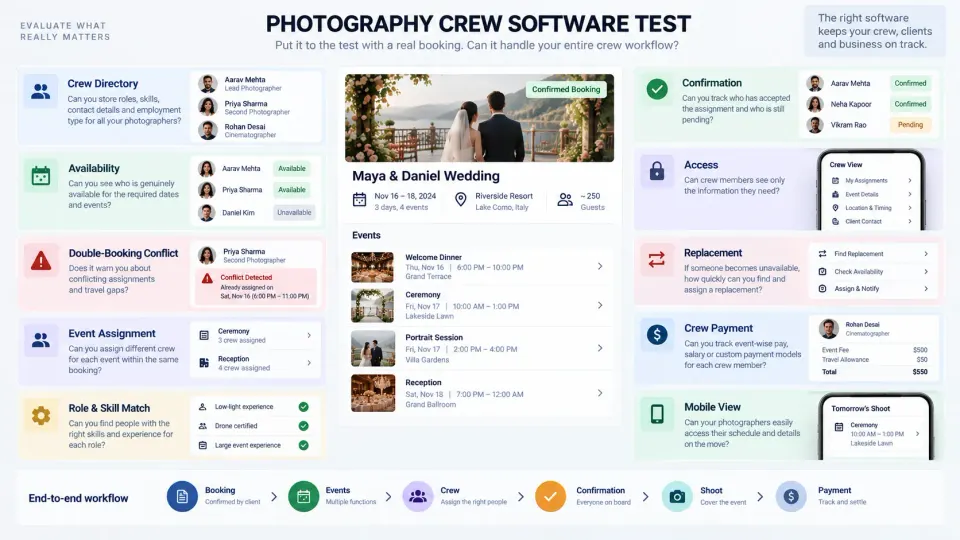
A product demo can make almost any scheduling system look organised. Test it with a booking that resembles the difficult work your studio actually handles.
Create a real-world scenario containing several events, overlapping crew requirements, one freelancer, one unavailable photographer, one pending confirmation and more than one payment model. Then try to run the complete staffing workflow.
Use this buyer checklist:
| Test | What the software should help you answer |
|---|---|
| Crew directory | Who works with us, and in what roles? |
| Availability | Who can genuinely take this event? |
| Conflict visibility | Is someone already assigned elsewhere? |
| Event-level staffing | Who covers each function or shoot segment? |
| Role matching | Is the available person appropriate for the required job? |
| Confirmation | Has the person actually accepted the assignment? |
| Access | Can crew see the information needed without seeing everything? |
| Replacement | Can we recover quickly if somebody becomes unavailable? |
| Payment context | What salary or event-wise cost belongs to this work? |
| Mobile use | Can the field team understand the assignment from a phone? |
| Booking connection | Do changes to the job remain connected to the crew plan? |
Also test how quickly a manager can answer a question such as, “Can we safely take another large event on this date?” A system that stores information but still requires several spreadsheets and group chats to answer that question has not solved the scheduling problem.
How GoPickle Crew Management works around the booking
When we designed crew workflows at GoPickle, we did not start with the idea of building a generic employee list. Photography teams work around bookings, and bookings break into events. That structure determines what roles are required, who needs to be available and what each person must know.
In GoPickle Crew Management, studios can maintain a crew directory, review availability and rota context, assign people across events and roles, track whether crew is confirmed, identify missing roles or conflicting assignments, control access according to responsibility and keep salary or event-wise payment context connected to the work.
The crew workflow sits beside GoPickle's wider photography workflow management, where leads, quotations, bookings, invoices, payments, crew and galleries form parts of the same client and production journey. That matters because the crew plan should respond to the booking rather than becoming a second version of it.
A venue change is a booking change. A new function is a booking change. A cancelled event is a booking change. The staffing plan needs to follow those changes instead of surviving as an outdated screenshot in a group chat.
Software becomes worth considering when coordinating the team is consuming more attention than managing the work. At that point, the value is not another calendar. It is having one dependable operational path from what the studio sold to who is going to deliver it.
For a growing photography business, that is the real standard to use when evaluating photography crew scheduling software: can the system turn each confirmed booking into a crew that is suitable, available, assigned, informed, confirmed and financially accounted for before shoot day?