Photography Post-Production Status Board: Track Cull, Edit, Retouch, QC and Delivery
Build a photography post-production workflow that tracks culling, editing, retouching, QC, owners, blockers, due dates and final client delivery.

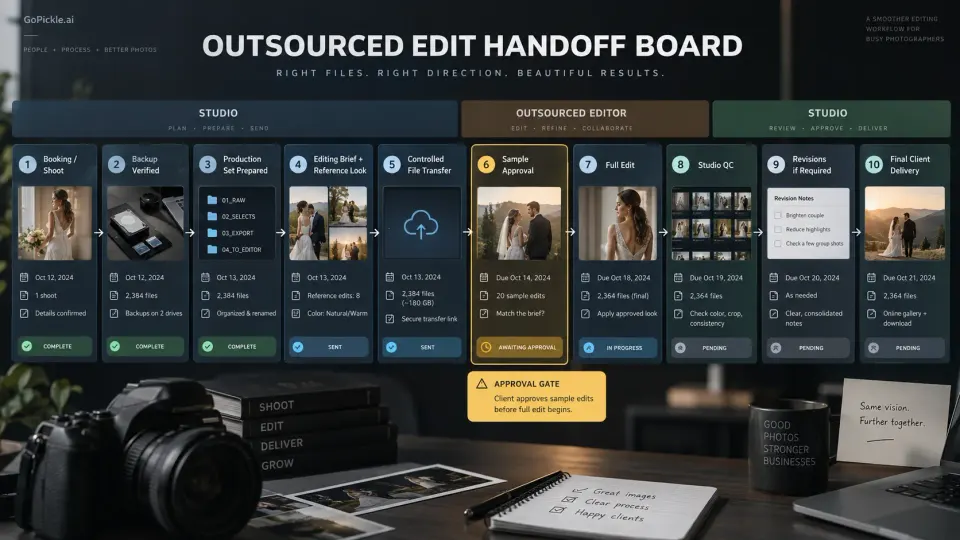
A photography studio can have every RAW file safely stored, editors working all day and a delivery calendar full of dates, yet still struggle to answer a basic operational question: where is each job right now?
That becomes surprisingly difficult once several weddings, portraits, commercial assignments or events are moving through post-production at the same time. One job has been culled but nobody has started the edit. Another is 90% edited but waiting for five hero images to be retouched. A third appears finished until somebody discovers that final quality control was never completed. Meanwhile, the studio owner remembers the client deadline but not which person currently owns the next action.
A strong photography post production workflow needs more than folders named TO EDIT, FINAL and FINAL FINAL. It needs a small set of production states that everyone understands, plus an owner, due date, blocker and next action for every active job. The purpose of a post-production status board is not to replace Lightroom, Capture One, Photoshop or whichever specialist editing tools your team prefers. It is to make the work moving between those tools visible.
Define one production state at a time
The most useful status on a production board is the one that describes what is happening now, not every activity that has happened to the job.
A wedding cannot meaningfully be “Culling / Editing / Retouching / QC” at the same time simply because all four activities will eventually happen. If the photographer has finished the cull and the editor has not yet begun colour work, its current production state is Ready for Editing. If the main edit is complete but selected portraits are with a retoucher, the state is Specialist Retouching.
For each job, we recommend tracking at least six fields:
| Field | What it should tell the studio |
|---|---|
| Current stage | Where the work is now |
| Stage owner | Who is responsible for moving it forward |
| Stage entered | How long it has been sitting there |
| Internal due date | When this stage should finish |
| Blocker | What is preventing progress, if anything |
| Next action | The specific thing that moves it to the next stage |
The distinction between state and blocker matters. “Waiting for client selection” may legitimately be a production state when selection is a required part of the workflow. “Editor on leave”, “drive not received” or “retouch instructions unclear” are better treated as blockers because they explain why an otherwise normal stage has stopped moving.
A practical status sequence might be:
Ingested → Backup Verified → Culling → Ready for Edit → Editing → Specialist Retouching → QC → Ready to Deliver → Delivered
Not every photography business needs every state. A short portrait session may move from culling directly into editing and QC. A commercial campaign may add agency selection and approval stages. A complex wedding post production workflow may contain separate editing queues for photography, film, album selects and hero retouching. The objective is not to create the longest workflow; it is to make every status precise enough that two team members interpret it the same way.
Ingested and backed up are different states
A memory card being copied onto a workstation does not mean the assignment is safely ready for production.
Treat Ingested and Backup Verified as separate checkpoints if losing the original files would create serious business or client risk. Ingested means the captured media has been transferred into the studio's working structure. Backup Verified means the studio has completed whatever backup verification its own policy requires before downstream production begins.
This article is not intended to duplicate a complete backup procedure; our photography file backup workflow covers that subject separately. The important status-board principle is simpler: do not allow “files copied” to quietly become “files safe” unless somebody has actually completed the required check.
For multi-photographer events, this stage should also expose incomplete ingestion. If three photographers covered a wedding and only two cards have been received, the board should not make the project look ready for culling merely because thousands of photographs are already present.
Culling and selection need a clear finish line
Culling is one of the easiest stages to leave half-defined. Somebody starts reviewing a large shoot, marks several hundred photographs, gets interrupted and returns later. Unless the team knows what “Cull Complete” means, the next editor cannot confidently begin.
Define the exit condition. For one studio, that may mean technical rejects removed, duplicates reduced, storytelling choices made and the final edit set locked. Another may use an assisted-culling tool for the first technical pass and require a photographer to make the final creative selection. Adobe's current Lightroom workflow, for example, can assist with checks such as subject focus, eye focus, closed eyes and exposure issues while still allowing the photographer to review and override the results.
Do not confuse the photographer's cull with the client's selection. They answer different questions. Culling determines which captures are strong enough to continue through production; client selection determines which approved photographs should receive a specific deliverable such as detailed retouching, printing or album placement. Our guide to client photo selection software for photographers explains that downstream workflow in more detail.
If a client decision is required, show it explicitly. A portrait job might move:
Culling → Proof Ready → Waiting for Client Selection → Selection Confirmed → Retouching
That is much clearer than leaving the project under “Editing” for nine days while the studio is actually waiting for somebody else to act.
Editing and specialist retouching should not share one vague status
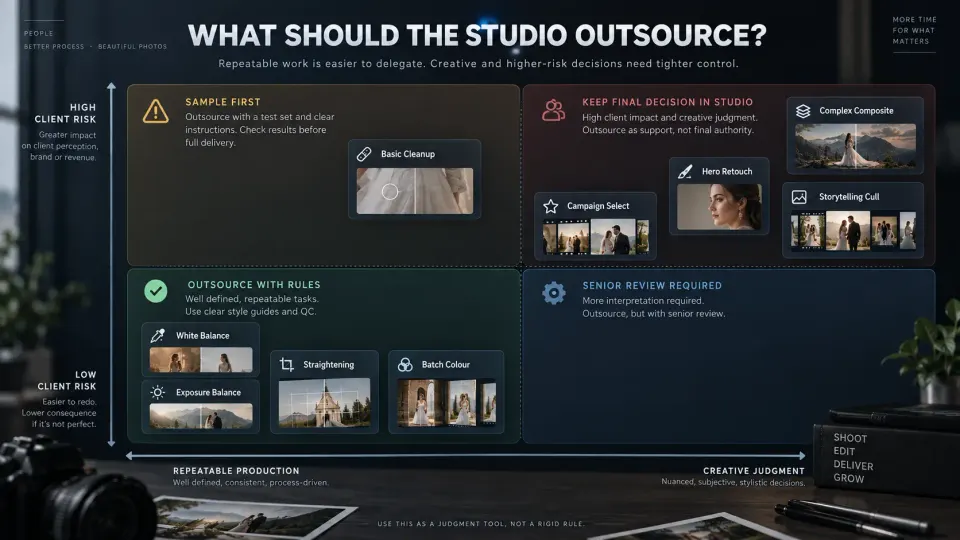
“Editing” can mean almost anything inside a photography studio. It may refer to batch exposure and colour work across 800 wedding photographs, individual Photoshop retouching on 20 portraits, skin cleanup, compositing, object removal, album corrections or simply preparing exports.
Separate stages when they have different owners, different effort profiles or different completion criteria.
For example:
Main Edit can cover the consistent production pass across the approved set: exposure, colour, white balance, crop and the studio's normal finishing treatment.
Specialist Retouching can cover image-specific work such as detailed skin work, complex cleanup, compositing, product corrections or a smaller collection of premium hero photographs.
This distinction improves photography workflow management because the studio can immediately see why an apparently edited job has not reached QC. It also makes capacity easier to understand. If five weddings are stuck in Main Edit, you have one kind of production problem. If all five are waiting for a single senior retoucher, you have another.
The owner should change when the work changes hands. If the main editor sends eight photographs to a retoucher, the studio should be able to see who is expected to return them and by when. When the revised files return, the next action should move back to whoever owns integration or QC rather than relying on a message thread to complete the handoff.
When queues become crowded, use the production board alongside a proper priority system. Our guide to editing backlog triage covers how promised delivery dates, blockers, project age and remaining effort can determine which job deserves capacity first.
Quality control is a production stage, not a quick glance
A finished edit should not move straight into client delivery simply because the editor exported it.
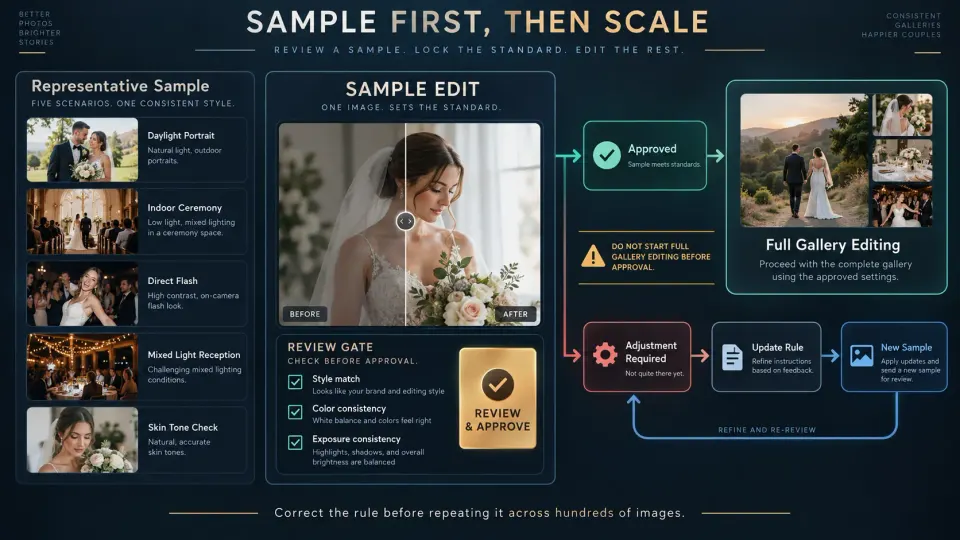
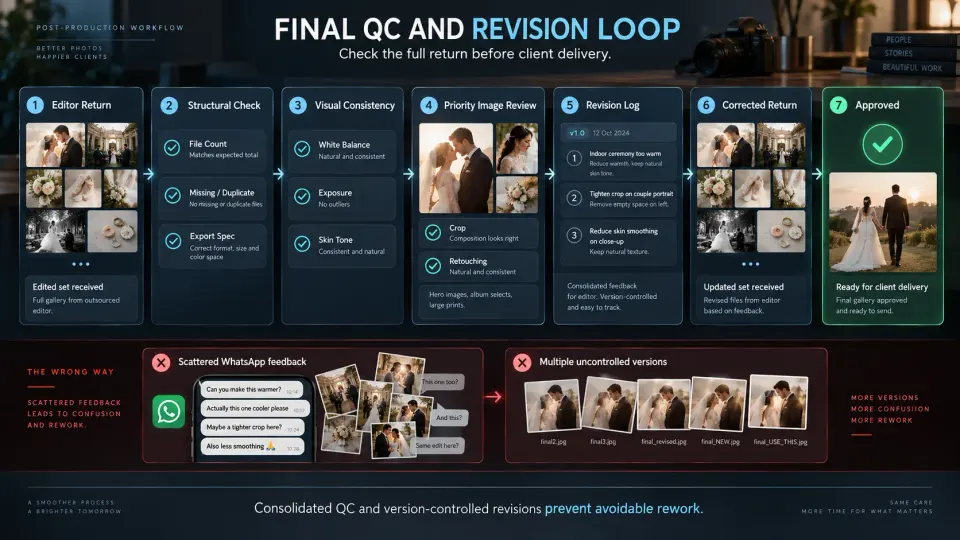
QC deserves its own status and its own owner. Depending on the studio, that person may be the lead photographer, post-production manager, studio owner or another editor who did not perform the original batch edit. The important point is that somebody is explicitly responsible for deciding whether the work is ready to leave production.
The QC pass may check image count, missing files, duplicates, exposure consistency, colour shifts, skin tone, crop problems, retouching artefacts, unexpected black-and-white conversions and whether the final output matches the job's delivery specification. A large wedding does not necessarily require every frame to be inspected at identical magnification, but hero photographs, heavily retouched files and unusual lighting conditions deserve deliberate attention.
Internal post-production QC should also remain separate from gallery-release QC. The photographs can pass visual production checks while the client gallery still contains the wrong permissions, collection order or download settings. Use the photography gallery delivery checklist once the actual delivery environment is being prepared.
This is one of the reasons a status such as QC Failed is usually less useful than keeping the job in QC with a revision blocker or moving it into Revision Required. The board should tell the team what happens next, not simply record that something went wrong.
Ready to deliver and delivered are not the same thing
This distinction sounds obvious until a busy studio begins using the words interchangeably.
Ready to Deliver means production is complete, QC has passed and the approved files are available for release. The client has not necessarily received them.
Delivered means the agreed client-facing handoff has actually taken place.
The difference is operationally important. A gallery can sit ready for two days because the studio is waiting for payment, an embargo date, final client confirmation or the person responsible for releasing it. Marking that project Delivered early hides unfinished work.
The same principle applies at booking level. GoPickle's guide to photography booking statuses separates completed shoot coverage from client delivery and final closure. A booking can be completed from a shoot perspective while substantial post-production still remains.
Once a job genuinely reaches final release, GoPickle Client Galleries can provide the client-facing layer for organised collections, access controls, favourites, downloads and mobile-friendly delivery. The internal production board and the client gallery solve different problems: one controls unfinished work; the other presents approved work to the client.
Review the production board every week
A status board becomes decoration if nobody uses it to make production decisions.
Run a short weekly review across every active post-production job. Sort first by promised delivery date, then inspect how long each project has been sitting in its current stage. A job can be three weeks away from its client deadline and still deserve attention if it has spent nine days waiting for an editor without moving.
For each active job, ask:
- Is the current production state accurate?
- Does one person clearly own the next action?
- Is there a blocker?
- How long has the job been in this stage?
- Is its internal stage deadline still realistic?
- Is another person, supplier or client waiting for this work?
- Is the promised delivery date becoming exposed?
- What exactly must happen before the job can move one column to the right?
This review should complement, not replace, your delivery planning. A promised date tells you when the client expects the work. The board tells you whether the work is moving quickly enough to reach it. Our guide to setting a realistic photography turnaround time explains how editing time, client-dependent stages and final delivery commitments fit together.
For a solo photographer, the board may be a lean list with eight jobs. For a studio with photographers, editors, retouchers and album staff, it may become a fuller production view with stage owners and dependencies. The principle is identical: every active job should have one truthful current state and one clear path forward.
Keep production status connected to the booking
Post-production does not begin as an isolated folder. It begins with something the studio promised to a client.
The editor may need to know which events are included, what was sold, which deliverables require special treatment and when the final work was promised. That context belongs with the booking, not in somebody's memory. GoPickle Booking Management keeps client, event, service, deliverable, crew, payment and delivery context connected around the confirmed job, while the studio can continue using its preferred specialist tools for culling, editing and retouching.
More broadly, GoPickle's photography workflow management is built around keeping the commercial journey connected from enquiry and booking through team coordination and final gallery delivery. That does not mean your RAW files need to live in the same application as your invoices. It means the people running the studio should be able to understand the state of the client commitment without reconstructing it from five separate systems.
A good photo editing workflow for photographers does not need dozens of statuses. It needs enough structure that unfinished work cannot disappear. When every project has a current stage, owner, blocker, due date and next action, the production board stops being an administrative exercise and becomes a control system for delivery.
The result is not faster editing by itself. It is fewer jobs waiting unnoticed, cleaner handoffs between people, earlier warning when deadlines are at risk and a much clearer route from captured files to work that is genuinely ready for the client.